
Bump Pulse: Contraction Timer
Developer On WheelsParenting
4.69.00 Reviews
- Version
- 3.5.0
- Installs
- 10.00K
- Age Rating
- Everyone
Screenshots
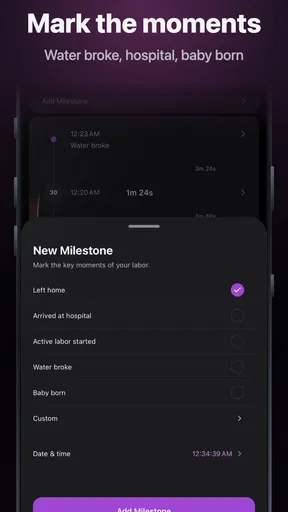
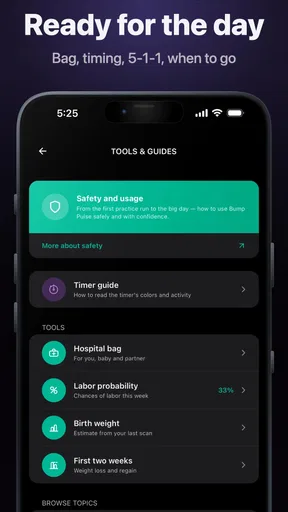
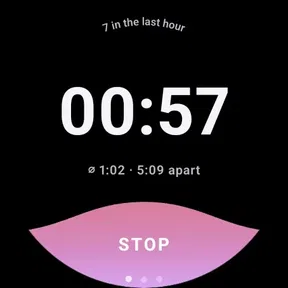
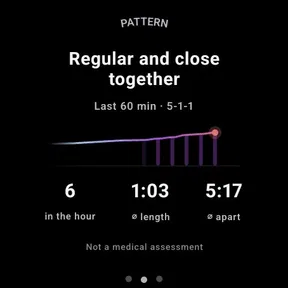
Our Review of Bump Pulse: Contraction Timer
 Analysis by Appyee
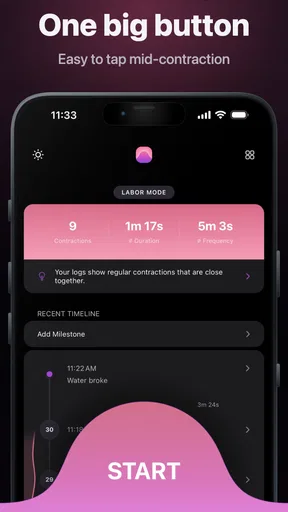
When labor starts to feel real, the last thing I want is an app that makes me think harder. Bump Pulse is built for that narrow, stressful moment: it lets me time contractions, count them, and share the live information with a partner. I found its appeal easy to understand in the first week of trying it. The idea is simple, the purpose is clear, and it focuses on one job instead of turning pregnancy support into a crowded dashboard.
That focus is also the key question for me: does a contraction timer deserve a lasting place on a phone, or is it useful only when labor begins? My answer is that Bump Pulse is mainly a situation-specific tool rather than a daily parenting companion. That is not a criticism by itself. A tool can be worthwhile precisely because it is ready when you need it, even if you ignore it for long stretches. The important thing is knowing what kind of value you are paying attention to.
What the first week feels like
In the first few days, I would use Bump Pulse to become familiar with the basic rhythm of starting and stopping a contraction entry. That preparation matters because labor is not the ideal time to learn where controls are or decide who should receive updates. A short practice session can make the real workflow calmer: one person concentrates on the timer while the other stays present with the person in labor.
The app belongs in the parenting category, but its role is more focused than a general pregnancy planner. It is not trying to fill the phone with checklists, articles, appointments, or broad family organization. Its store summary describes a contraction tracker timer and counter with live partner sharing for labor, and that description matches the practical reason I would install it: recording timing information while keeping a partner involved.
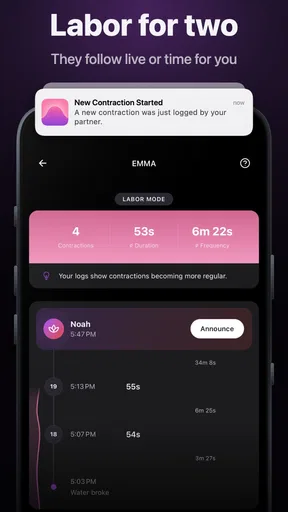
That live sharing is the feature that gives Bump Pulse a reason to exist alongside a basic stopwatch. A stopwatch can measure elapsed time, but it does not naturally turn the process into shared information. With this app, the partner can be part of the same flow rather than repeatedly asking for updates or trying to interpret notes sent in fragments. In a tense room, reducing those small conversations can be more valuable than adding a long list of advanced tools.
I also appreciate that the app is free to start using. That lowers the barrier for someone who wants a dedicated contraction timer without committing money before knowing whether it fits their routine. There are in-app purchases priced at $3.99 per item, so I would still check the purchase screen carefully before treating every available option as part of the free experience. The sensible approach is to begin with the core timing workflow and only consider an optional purchase if it solves a problem you actually have.
The age rating is Everyone, which makes the app feel straightforward to share within a household. That does not mean every family will use it in exactly the same way. Some couples will want one person to handle all timing, while others may alternate depending on who is driving, resting, or helping with other preparations. The app is most useful when the couple agrees on that arrangement before contractions become intense.
A realistic labor-day workflow
Imagine contractions are becoming regular in the evening. One partner opens the timer and records each event as it happens. The other stays close, gathers the essentials, and watches the shared updates instead of asking after every contraction. After several entries, both people have a clearer picture of the pattern they are observing. If they need to contact a healthcare professional, the recorded timing can help them describe what has been happening more clearly.
I would not treat the app as a medical decision-maker. A timer can organize observations, but it cannot replace instructions from a midwife, doctor, or maternity unit. That distinction is especially important for first-time parents, who may be tempted to wait for an app to tell them that labor is “official.” Bump Pulse is better understood as a communication aid and record-keeping tool, not as a substitute for professional guidance.
One non-obvious advantage of practicing early is that it reveals the human workflow, not just the software workflow. If the person in labor does not want to touch a phone, the partner needs to know how to operate the timer without interrupting them. If the phone is being used for calls, navigation, or messages, the couple should decide who takes responsibility for timing. These decisions are small, but they determine whether the app feels helpful or becomes another task.
Where it beats the usual alternatives
The usual alternatives are a phone stopwatch, a notes app, a spreadsheet-like log, or a general pregnancy application that includes contraction timing as one feature among many. A stopwatch is flexible but makes the user interpret and organize the results. Notes can preserve context, yet manual entries become awkward when contractions are close together. A broad pregnancy app may be useful throughout pregnancy, but its extra sections can also make the important control less immediate.
Bump Pulse has a clearer identity than those options. Its value comes from combining timing, counting, and partner sharing in one focused experience. I would choose it over a stopwatch when two people need to follow the same information. I would choose a general pregnancy app instead if I wanted one place for many kinds of pregnancy planning and did not mind navigating a wider feature set.
Does it keep earning space after the novelty?
I find the lasting case for a dedicated contraction timer less about opening it often and more about whether its role stays clear when routines change. In this section, I look at how I would keep the tool useful without turning it into another daily obligation, and where a simple backup plan matters more than extra screen time.
Month-to-month value is intentionally limited
After the first week, the app’s recurring value changes. I would not expect to open a contraction timer every day for entertainment or routine planning. Its long-term usefulness is more like keeping a flashlight in a drawer: most of the time it is inactive, but being prepared can matter when the need arrives. That makes Bump Pulse a practical utility with occasional high importance rather than a habit-forming app.
For someone still several weeks away from labor, the month-to-month routine should be light. I would keep it installed, make sure the intended partner knows about it, and occasionally confirm that both people remember the basic process. There is no reason to manufacture daily use. Forcing a habit around an app that is meant for a specific event can create unnecessary fatigue and make it feel more demanding than it is.
The app can also have value across more than one pregnancy, depending on the family’s circumstances and willingness to use the same tool again. That is a different kind of durability from a budgeting app or a messaging service. Its worth is not measured by frequent launches; it is measured by whether it remains understandable and available when the relevant moment comes back around.
Its current version is 3.5.0, and the app supports devices running Android 7.0 or later. Those details matter for households using an older phone as the dedicated device for labor support. I would check compatibility before relying on that spare phone, especially if the main phone and backup phone are from different generations. A plan that depends on a particular device should be tested before the day it is needed.
The app has reached over ten thousand installs and holds a 4.6 average from 96 ratings, with 9 written reviews shown alongside that score. I read those numbers as a sign of encouraging reception, but not as a reason to assume it will fit every couple. A focused app can work very well for people who want a focused tool, while feeling too narrow for someone seeking a complete pregnancy information system.
The maintenance burden is small, but not zero
Maintenance here is less about entering data every day and more about keeping the workflow dependable. I would install it early enough to become comfortable with it, keep the phone charged, and decide which partner will operate the timer under pressure. If live sharing is central to the plan, both people should understand how that connection is supposed to work before labor begins rather than discovering the process during a contraction.
I would also avoid making the app the only record of what is happening. If a healthcare professional gives specific instructions about when to call or come in, those instructions should guide the couple. It is sensible to keep important contact details available separately and to have a backup timing method in mind. A simple clock or stopwatch is enough as a fallback; the point is not to distrust Bump Pulse, but to avoid letting any single phone feature become a source of panic.
Another useful maintenance habit is deciding what information actually needs to be shared. Live partner updates can reduce repeated questions, but constant checking can also make everyone stare at the phone. The partner who is not timing should use the information to provide practical help, not to monitor every second obsessively. This is where the app’s social feature needs a human rule around it.
The developer is Developer On Wheels, and the app is free with optional in-app purchases. I would treat that pricing model as a reason to review any upgrade prompt calmly, not as a problem in itself. Because the app’s core purpose is narrow, an optional purchase is worthwhile only if it makes the timing-and-sharing workflow noticeably easier for your household. If you only need a basic timer, the free starting point may be enough.
What can create fatigue
The biggest possible source of fatigue is repetition during a high-stress event. Even a well-focused timer can become irritating if the person timing must interact with the phone too often, especially when the contractions are intense or the partner is also handling bags, transport, calls, and reassurance. The app reduces some coordination work, but it cannot remove the need for someone to pay attention.
Live sharing can create a second kind of pressure. It is useful when the partner is in another room, driving, or handling preparations, but it may feel intrusive if the person in labor wants fewer notifications and less conversation. I would agree in advance about when sharing is helpful and when the phone should be put aside. The best use of the feature is selective, not automatic attention to every update.
A focused contraction timer may also feel too limited between pregnancies. If you want weekly guidance, appointment organization, birth-plan notes, feeding preparation, or broader household reminders, you will need another app or another system. Bump Pulse does not become a complete parenting organizer simply because it sits in the parenting category. Its narrowness is its strength during labor and its weakness as an everyday companion.
There is also a mental trap in relying too heavily on numbers. Timing can make a confusing experience easier to describe, but it can also encourage people to watch patterns instead of responding to how the person feels. I would use the entries to support communication, never to dismiss pain, warning signs, or professional advice. That is the most important boundary around this kind of app.
Who should install it, and who should skip it?
I think Bump Pulse is a good fit for expectant parents who want a dedicated, uncomplicated way to record contractions and keep a partner informed. It is particularly suitable when one person expects to do the timing while the other focuses on comfort, transport, or preparation. Couples who dislike juggling notes, stopwatch controls, and repeated messages will get the clearest benefit from its focused approach.
I would skip it if you already have a trusted contraction feature inside an app you use regularly and do not need separate partner sharing. I would also look elsewhere if your priority is a broad pregnancy platform with education, appointments, checklists, and long-term family organization. Installing another narrow utility in that situation may add clutter without improving your routine.
It may not be the right choice for someone who strongly prefers paper records or who expects the laboring person to operate the phone personally. In that case, the partner-sharing concept may not match the household’s preferred style. A basic stopwatch and a prepared note can be more comfortable if the family wants the fewest possible moving parts.
My long-term verdict
After the initial novelty fades, Bump Pulse earns its place by being available for a specific, important occasion rather than by demanding regular attention. I would not call it a daily app, and I would not judge it by how often I open it in an ordinary month. Its lasting value comes from preparation: knowing where it is, knowing who will use it, and knowing that the timing information can be shared instead of reconstructed later.
The strongest reason to recommend it is the combination of a contraction timer and live partner involvement. That pairing is more useful than a bare stopwatch for couples who want to coordinate without constant verbal updates. The main trade-off is its narrow scope, along with the need to keep human judgment and medical advice ahead of anything displayed on the screen.
For me, the best way to use it is to install it before labor, test the workflow once, discuss a backup plan, and then leave it alone until it is genuinely needed. That approach avoids turning preparation into another daily obligation. If you want a focused labor utility and accept that it will spend much of its life waiting, Bump Pulse is an easy app to justify keeping around.
My recommendation is conditional but positive: choose it for focused contraction timing and partner coordination, not as a complete pregnancy or parenting system. It is free to begin with, available to a broad range of older Android devices, and its purpose is clear. Just remember that its real success depends less on constant use than on a calm, agreed-upon workflow when the moment finally arrives.
Verdict
Strengths of Bump Pulse: Contraction Timer
- Simple one-tap timing makes tracking contractions quick and convenient.
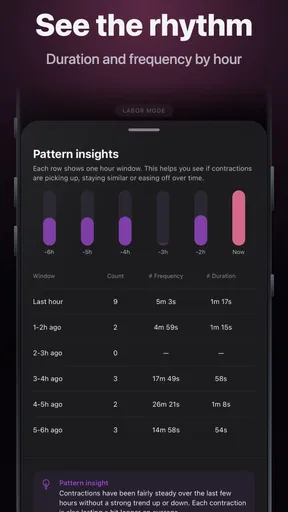
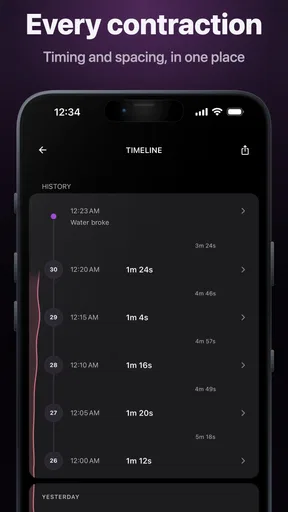
- Clear interval history helps identify changing contraction patterns.
- Useful for monitoring early labor at home between medical check-ins.
- Focused design avoids unnecessary features and distractions.
- Helpful records can make conversations with healthcare professionals easier.
Limitations of Bump Pulse: Contraction Timer
- Not a substitute for medical advice or professional labor assessment.
- Results depend on remembering to start and stop each contraction accurately.
- May be less useful if contractions are irregular or difficult to distinguish.
- Phone notifications, calls, or interruptions can affect timing accuracy.
- Some features or conveniences may depend on the device and app version.
Similar Picks in This Category
View All
Family Space
Motorola Mobility LLC.3.9

شرطة الأطفال - مكالمة وهمية
Oub Apps4.1

Findmykids: Parental Control
LETEM LTD4.6

Pregnancy + | Tracker App
Philips Electronics UK Limited4.8

Policía de niños - para padres
Kids police4.7

Pregnancy App
Amila4.9
Frequently Asked Questions
What is Bump Pulse: Contraction Timer used for?
Bump Pulse: Contraction Timer is designed to help expectant parents record and monitor labor contractions. You can start and stop a timer for each contraction, review its duration, and observe the intervals between contractions. This information can make it easier to recognize changing patterns and communicate useful details to a midwife, doctor, or maternity unit when labor may be beginning.
How do I track contractions with Bump Pulse?
When a contraction begins, tap the start button, then tap it again when the contraction ends. The app records the contraction’s duration and calculates the time until the next one. After several entries, you can review the timing history to see whether contractions are becoming longer, stronger, or more regular. Accurate tapping is important, so try to use the same method each time.
Can Bump Pulse tell me when to go to the hospital?
No. Bump Pulse can organize contraction timing, but it cannot diagnose labor or make a safe decision about when you should seek medical care. Recommendations can vary according to your pregnancy, medical history, distance from the hospital, and your healthcare provider’s instructions. Always follow the guidance given by your doctor or midwife, and contact them if you are uncertain or concerned.
Does Bump Pulse: Contraction Timer require an internet connection?
The basic timing function may be usable without a continuous internet connection, which is helpful when you are away from reliable mobile data or Wi-Fi. However, certain features, updates, advertisements, account functions, or synchronization options may depend on the app version and device settings. Check the store listing and the app’s privacy or permissions information before relying on it offline.
Is Bump Pulse a replacement for medical advice?
No. Bump Pulse: Contraction Timer is a tracking tool rather than a medical device, and its results should not be treated as professional advice. Contact your healthcare provider immediately if you experience heavy bleeding, severe or unusual pain, reduced fetal movement, leaking fluid, or any symptom that worries you. In an emergency, use local emergency services instead of waiting for the app to provide guidance.
